WITH · APPLE WATCH
Your Watch shows the pattern. Add the sound behind the night.
Apple Watch is useful for wearable trends and breathing-disturbance information. SomniSense adds a separate acoustic record you can inspect — using only the phone already beside your bed.
If you already wear an Apple Watch to bed, you are not starting from zero. You already understand multi-night tracking. SomniSense is for the next question: what did the phone microphone capture during the seconds worth reviewing? It does not replace or automatically merge with Watch data; it adds a different, reviewable signal.
WHAT SOMNISENSE ADDS
Keep the wearable signal. Add the candidate sound region behind the night.
The real SomniSense app screen below preserves the selected minute, model-estimated candidate type and duration, marked waveform, available audio, and its position in the whole night. Keep Apple Watch for its own movement and physiological trends; SomniSense adds an independent acoustic layer and does not synchronize or validate Watch data.
- Candidate pause-like or shallow-breathing-like type, time, and model-estimated duration
- The marked waveform and playback of the sounds before and after the candidate interval
- Whole-night position, followed across nights in recent comparisons and structured reports
Phone audio is a limited wellness signal. Candidate regions are not clinical apnea events, AHI, oxygen measurements, airway-source findings, or a diagnosis.
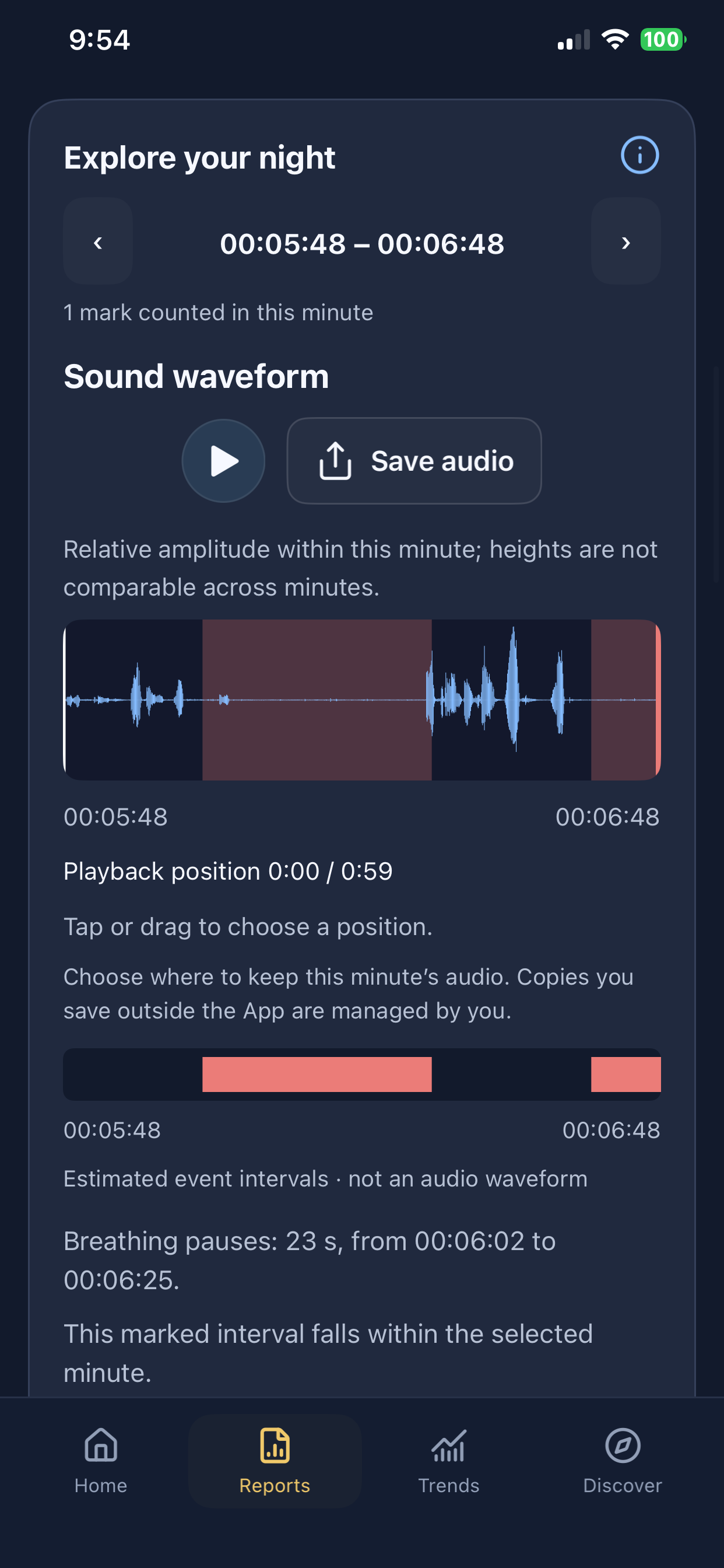
iPhone · version 1.2.0 interface example. Example recordings; your observations will differ.
What Apple Watch already gives you
Apple Watch is a strong general sleep and wellness tracker. Depending on your model, settings, and region, it can provide sleep duration and stages, heart-rate trends, respiratory rate, wrist temperature, blood-oxygen information, and breathing-disturbance information. Not every feature is available on every device or in every region.
For supported sleep-apnea notifications, Apple says the Watch uses its accelerometer to detect wrist movements associated with interruptions in normal breathing. The feature evaluates breathing-disturbance patterns over a 30-day period and is not intended to diagnose sleep apnea.
What SomniSense adds — and what it does not
SomniSense uses the phone microphone to organize a night of sound into a whole-night view and model-estimated candidate regions. Where local audio is available, you can review what the microphone captured around a candidate region instead of relying only on a score.
- Whole-night context — move from the night overview to a minute and then to the seconds marked for review.
- A separate acoustic modality — useful alongside a wrist-based view because it observes a different signal.
- Repeatable nightly review — compare nights, routines, and symptoms without buying or wearing another device.
- Clear limits — the phone does not measure airflow, oxygen saturation, respiratory effort, or sleep stages.
Candidate regions are model estimates, not proof that breathing stopped. SomniSense cannot explain every Watch flag, establish a cause, or turn two consumer signals into a diagnosis.
Choose the path that matches why you came here
My Watch sent a notification
Follow Apple's guidance and contact a qualified clinician. SomniSense can provide a separate wellness record while you wait, but it cannot confirm or dismiss the alert.
Understand the notification →My Watch is quiet, but I have symptoms
A quiet Watch does not explain away witnessed pauses, gasping, loud snoring, or persistent daytime sleepiness. Symptoms deserve their own next step.
Start with your symptom →I want another signal to compare
Run both on the same nights and compare broad patterns manually. Use differences as questions to investigate, not as proof that one device is right.
See the acoustic evidence view →I am already diagnosed or in treatment
Keep following your clinician's plan and prescribed equipment. SomniSense may add a supplemental wellness record, but it does not replace clinical monitoring.
How SomniSense fits beside CPAP →How to compare the two responsibly
Use the same date, note whether each device recorded enough of the night, and look for repeated patterns across multiple nights. An elevated wearable trend and more acoustic candidate regions on the same night may be worth discussing, but apparent agreement is still not clinical confirmation. Disagreement is also not proof that one product failed: the devices observe different signals and have different coverage.
Put your phone by your bed and review your own night after sleep.
Your first complete breathing report is free to view—and stays free to revisit.
No valid report yet? You can try again for free.
Start for freeRecording and analysis stay free. Pro unlocks later complete breathing reports; snoring stays free.
Source and product status
Apple feature details: Apple Support — Sleep apnea notifications on Apple Watch. Availability depends on device, region, and software. SomniSense currently compares side by side; it does not synchronize Apple Watch or Apple Health data.
Read next
Common questions
- If I already use Apple Watch, why add SomniSense?
- Apple Watch gives you wearable trends and, on supported devices and regions, breathing-disturbance information. SomniSense adds a separate phone-acoustic view: a whole-night timeline, model-estimated candidate regions, and available local audio for review. It is most useful when you want a second modality, not another overall score.
- Does SomniSense read or synchronize my Apple Watch data?
- No. There is no automatic Apple Health or Watch synchronization in the current product. Compare the two apps manually by date and time; do not treat apparent agreement as a clinical confirmation.
- Will SomniSense affect my Watch battery?
- SomniSense runs on the iPhone, so it does not use the Watch battery. Phone battery use varies by device, battery health, settings, and recording duration, so we do not promise one fixed overnight percentage.
- Can SomniSense confirm an Apple Watch sleep apnea notification?
- No. Apple Watch and SomniSense observe different signals, and neither SomniSense BRI nor its acoustic candidate regions can confirm or dismiss a Watch notification. Follow Apple's guidance and discuss a notification or concerning symptoms with a qualified clinician.