WITH · OURA
Keep your Oura trends. Add the sound behind the night.
Keep the sleep and recovery context from your Oura Ring. Use your bedside phone to add something you can listen to: possible breathing pauses, marked in the recording for you to review the next morning.
Oura users are often a strong fit for SomniSense because they already know that one night is not a trend. The missing piece may not be another score. It may be a different signal: what the phone microphone captured around a model-estimated candidate region.
WHAT SOMNISENSE ADDS
Keep the recovery context. Add a reviewable sound layer.
The real screen below shows a possible breathing pause in a selected minute. See its estimated duration and position in the night, then play the preceding sound and the sound that resumes. This is a separate phone recording; SomniSense does not import, synchronize or verify your Oura data.
- Candidate pause-like or shallow-breathing-like type, time, and model-estimated duration
- The marked waveform and playback of the sounds before and after the candidate interval
- Whole-night position, followed across nights in recent comparisons and structured reports
Phone audio is a limited wellness signal. Candidate regions are not clinical apnea events, AHI, oxygen measurements, airway-source findings, or a diagnosis.
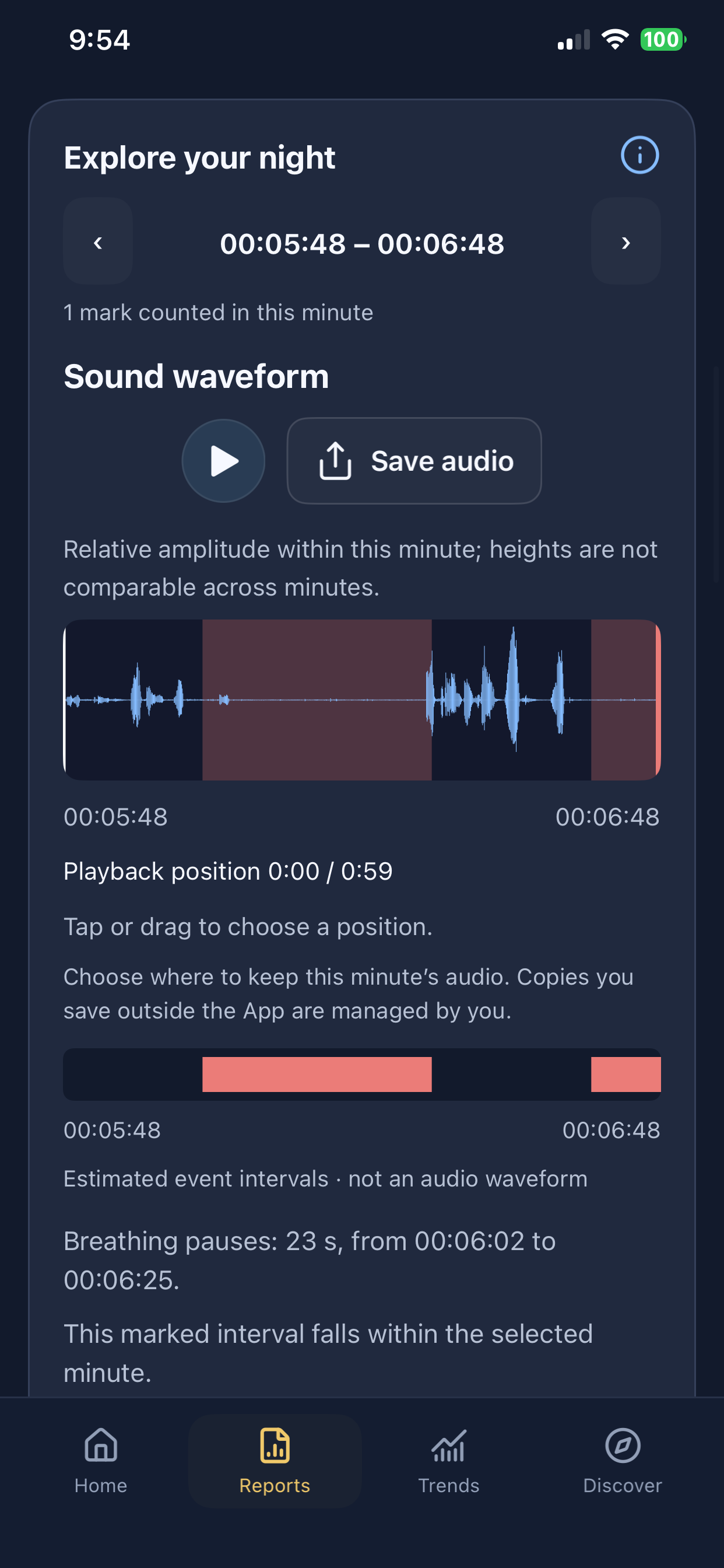
iPhone · version 1.2.0 interface example. Example recordings; your observations will differ.
What Oura already does well
Oura combines signals such as heart rate, heart-rate variability, temperature, movement, and blood oxygen into sleep and recovery views. Its Nighttime Breathing view can also show variation over the night and longer-term patterns. Feature availability and presentation can vary by membership, region, hardware, and software version.
That broad context is valuable. It helps answer questions such as whether recovery, sleep timing, temperature, or overnight physiology looks different from your personal baseline.
What a phone microphone adds
A ring does not record room audio. SomniSense uses the phone microphone to build a separate acoustic view: whole-night context, minute-level navigation, model-estimated candidate regions, and available local audio for review.
- Review instead of infer — inspect what the microphone captured around selected candidate regions.
- Different evidence unit — move from a broad nightly pattern to the seconds marked for closer review.
- No additional wearable — use the phone already beside your bed.
- Repeat across nights — look for patterns around routines without claiming that an association proves a cause.
SomniSense cannot identify the cause of a low Readiness Score, verify an Oura breathing variation, or tell you that a night was “clean.” It does not measure oxygen saturation, airflow, respiratory effort, HRV, temperature, or sleep stages.
Two views, four different questions
On a phone, swipe the table sideways to compare both columns.
| Your question | Start with Oura | What SomniSense can add |
|---|---|---|
| How did sleep and recovery compare with my baseline? | Readiness, Sleep, and underlying sensor trends | A separate acoustic record from the same date |
| What did the room microphone capture? | Oura does not record room audio | Playback of sounds around a candidate; access and retention limits apply |
| Did a routine coincide with a different night? | Compare Oura trends across dates | Compare SomniSense nights across the same dates |
| Do I have sleep apnea? | Neither product diagnoses it | Talk to a qualified clinician about symptoms or concerns |
How to compare without over-reading the data
Compare nights by date and first check whether both devices captured enough of the night. Look for repeated patterns rather than one dramatic night. If a routine, an Oura trend, and a SomniSense acoustic pattern move together, call it a personal association worth testing again — not proof that the routine caused the change.
Likewise, a steady Oura score does not rule out an acoustic concern, and fewer acoustic candidates do not explain a low Readiness Score. Different sensors can legitimately tell different parts of the same night.
Put your phone by your bed and review your own night after sleep.
Your first complete breathing report is free to view—and stays free to revisit.
No valid report yet? You can try again for free.
Start for freeRecording and analysis stay free. Pro unlocks later complete breathing reports; snoring stays free.
Sources and product status
Oura feature context: Blood Oxygen Sensing and Oura and medical conditions. SomniSense currently compares side by side; it does not import or synchronize Oura data.
Read next
Common questions
- If I already have Oura, why add SomniSense?
- Oura gives you a broad recovery and sleep view from finger-based sensors. SomniSense adds a separate phone-acoustic timeline with model-estimated candidate regions and available audio. It is most useful when you want to inspect sound rather than add another recovery score.
- Do Oura and SomniSense synchronize?
- No. The current SomniSense product does not import Oura data or automatically align the two timelines. Compare them manually by date, and treat any apparent relationship as a personal observation rather than proof of cause.
- Why might Oura and SomniSense look different on the same night?
- They observe different signals, cover the night differently, and produce different outputs. A readiness score, blood-oxygen variation, and an acoustic BRI are not interchangeable. Disagreement does not by itself mean either product failed.
- Can either product diagnose sleep apnea?
- No. Oura states that its ring is not a medical device and is not intended to diagnose medical conditions. SomniSense is also a wellness product; its acoustic observations and BRI are not a diagnosis or clinical AHI.